Home

AI for Busy Families
Dinner, school emails, and a calmer week.
Anyone can use this page. Copy the prompt and try it today.
$5.99
A page inside
Home
Dinner, school emails, and a calmer week.
Anyone can use this page. Copy the prompt and try it today.
$5.99
A page inside
Dear reader,
A family week can become messy very fast. A school note sits under the mail. Dinner has no plan. Someone needs a ride. A form must be sent tomorrow.
This book will not ask you to build a perfect system. It will help you sort one small part of the week.
You can use ChatGPT, Claude, or Gemini. You can use a phone, an iPad, or a computer. You do not need to type fast. You can copy one short box and change the words in square brackets.
The reply is only a draft. Read it before you cook, send, promise, buy, pack, or add anything to the calendar.
The app does not know your family. It was not in the kitchen. It did not read the school note. It does not know what another adult agreed to do.
You know those things. You stay in charge.
Start with one job that would make today a little easier. Stop when that job is done.
With care,
Everyday AI
This book helps you use an AI chat app for one family job at a time.
Mara starts with Sunday dinner. She does not ask the app to run her home. She asks for a short meal idea using food she already has.
You may use this book to plan meals, shape a school email, make a packing list, share chores, prepare health questions, or put the week in one view.
The app may write with confidence when it is wrong. It may add a date, rule, ingredient, place, price, or promise. Check those details yourself.
Do not paste passwords, school numbers, bank details, medical records, private messages, or another person’s notes. First names are usually enough.
Stop here: Pick the one family job that needs help first.
You only need a few words to use this book.
Prompt
A prompt is what you type or paste into the chat. It tells the app what help you want.
Copy box
A copy box is the cream-colored box on some pages. Change the words in square brackets. Then copy the whole box.
Paste
Paste means putting copied words into the chat. On a phone or iPad, press and hold in the message area. Tap Paste. Then tap the send arrow.
Check
Check means comparing the reply with real life. Look at the calendar, food labels, school message, map, weather report, or person involved.
Official app
An official app is the real app from the company named in the app store. Check the company name before you download. Avoid look-alike apps that ask for odd payments or private details.
If copying feels hard, ask someone you trust to show you once. You will use the same steps each time.
Stop here: Open your chosen chat app. Do not enter private information.
AI can help arrange words and lists. It cannot know what happened unless you tell it. Even then, it may guess.
A household study found that people use AI for useful online jobs such as education, job search, and finding information. The study did not show that laundry, cooking, or packing got done faster.
Another useful tip comes from Anthropic. When you have many notes, put the notes first. Put your request at the end. This helped in some tests with long material. It will not make every answer right.
Use this simple check:
A smooth sentence is not proof. A neat calendar is not a confirmed calendar.
Stop here: Decide which facts must be checked before anyone acts.
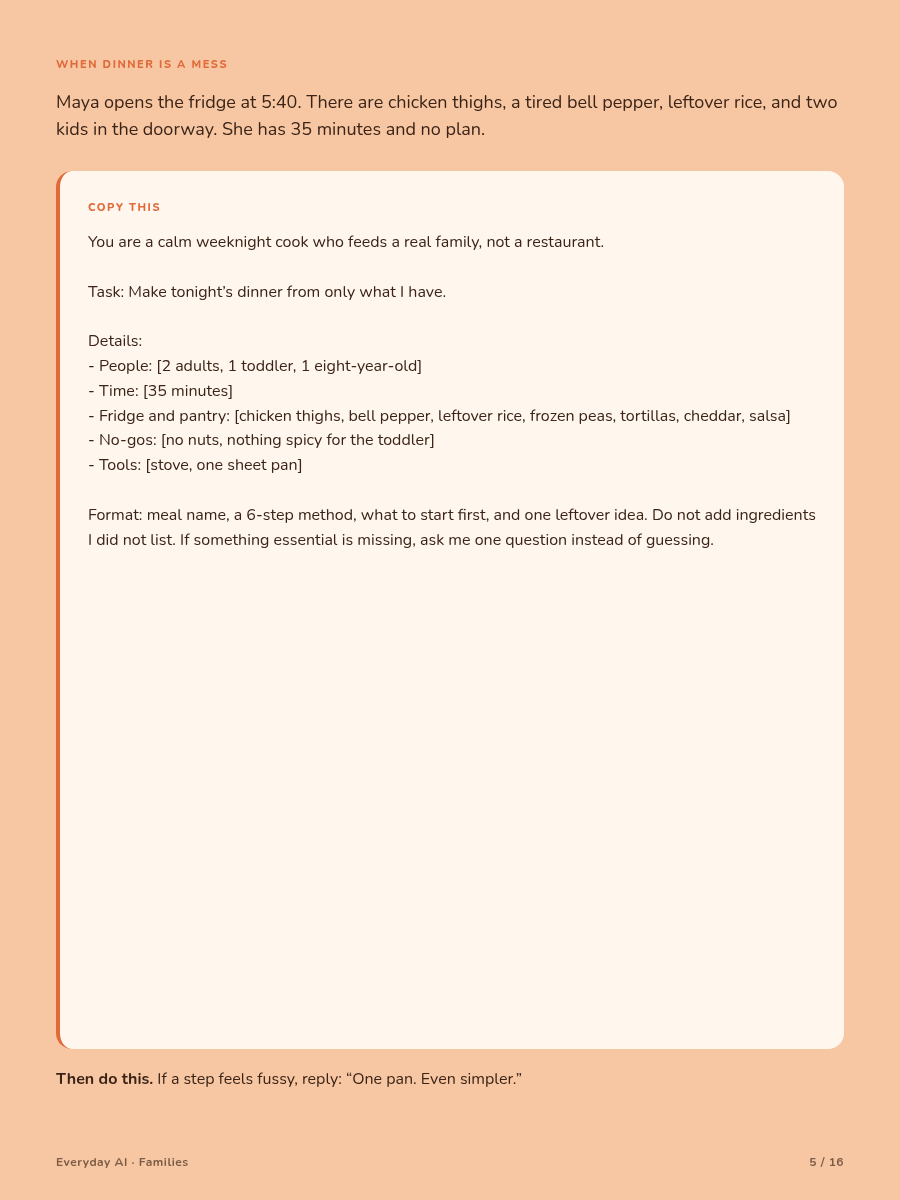
What you are doing: Make a small dinner plan with food already at home.
Mara opens the fridge. She has chicken, rice, peas, and one tired pepper. She does not want a recipe that adds six new foods.
COPY THIS
Do not: Trust the app to judge whether meat, eggs, or fish are safely cooked. Use your normal food-safety steps and a trusted official guide.
Next: Cross out any added food. Make the meal simpler if the steps feel tiring.
Stop here: You have a dinner you can check and make.
What you are doing: Ask a clear school question without guessing the answer.
Luis finds a school form after the due date. He wants to ask what is possible without making excuses.
COPY THIS
Do not: Send a line saying the school approved something unless the school truly did.
Next: Check the name, event, date, question, and any promise. Delete words you would not use.
Stop here: Send only when the note sounds like you.
What you are doing: Make a plan that protects your family’s limits.
Mara wants outdoor time and one grocery stop. A child needs a midday nap. The first plan has too many stops.
COPY THIS
Do not: Trust opening hours, prices, weather, or travel times without checking an official source.
Next: Ask the other adult or driver before treating the plan as settled.
Stop here: Keep some empty time in the day.
What you are doing: Make a list that fits the real trip and bags.
Luis is packing for two children. A favorite sleep toy matters more than a fourth shirt.
COPY THIS
Do not: Let the app choose medicine, doses, storage steps, documents, or safety gear. Follow labels and professional advice.
Next: Remove items your host has confirmed they provide. Touch each starred item as you check it.
Stop here: A useful list does not need to be long.
What you are doing: Test a ten-minute reset without blame.
The kitchen feels heavy after dinner. Mara wants a small shared reset, not a speech about responsibility.
COPY THIS
Do not: Use a reply that shames, compares, threatens, or guesses why someone is struggling. Check every child’s job for safety.
Next: Ask, “Which job can you do?” Change the plan if one person has most of the work.
Stop here: One test is enough for tonight.
What you are doing: Prepare a short family talk without letting an app set the amount.
Luis needs to discuss allowance with a child. He knows what the family can afford. The app does not.
COPY THIS
Do not: Let the app invent your income, bills, fees, punishments, or a “correct” allowance. This is not financial advice.
Next: Replace lines that do not match your budget or values. Leave time for the child to answer.
Stop here: The goal is a talk, not a perfect speech.
What you are doing: Turn scattered notes into questions for a clinician.
Mara has a health visit coming up. She wants to remember what to ask, not receive a diagnosis from a chat.
COPY THIS
Do not: Use the response to decide what an illness is or how to treat it. Do not paste medical records.
Next: Bring the real label or an accurate product list. Seek suitable local medical help for urgent or severe concerns.
Stop here: The clinician answers the questions.
What you are doing: Say what happened and why it mattered.
Luis wants to thank a neighbor who helped with the children. He wants warmth without making a new promise.
COPY THIS
Do not: Send an offer of money, childcare, a gift, or a visit unless you chose it. Do not let the app invent feelings or family details.
Next: Read the note aloud. Shorten any part that does not sound like you.
Stop here: A true thank-you can be brief.
What you are doing: Gather calendar facts without filling in the gaps.
Mara has a paper calendar, two messages, and a school email. One note says, “I can drive Wednesday,” but does not say who wrote it.
COPY THIS
Do not: Let the app assign a driver, merge two events, or turn “maybe” into “confirmed.”
Next: Ask the people involved about every CHECK item. Add only confirmed facts to the real calendar.
Stop here: An honest gap is safer than a neat guess.
What you are doing: Spend fifteen minutes looking at the next seven days.
A short check can prevent small surprises. It does not need to become a family meeting with charts and speeches.
Use paper if that is easier. Use the week page only when your notes are scattered.
Check these two things:
A family plan should have empty space. Leave room for rest, delays, weather, and changing needs.
If another adult would be surprised by the plan, ask before adding their name.
Stop here: Put the plan where the family normally looks.
Sometimes the reply looks polished but does not fit your life. You do not need to argue with it.
If it adds a fact
Delete the fact. Check the real source.
If it sounds too formal
Write, “Keep my facts. Use short, everyday words.”
If the plan is crowded
Write, “Keep the fixed items. Remove two optional steps.”
If it invents a school rule
Stop. Ask the school or read its official message.
If it volunteers someone to drive
Remove the name. Ask that person directly.
If it gives medical advice
Stop using that reply. Do not ask it to improve the diagnosis. Use a fresh chat only for questions to take to a clinician.
If it sounds harsh
Delete blame, shame, threats, and guesses about motives.
Another reply is not proof. Checking and revising can help, but they do not turn a guess into a fact.
Stop here: Write the short answer yourself if fixing the reply takes more effort than the job.
This is a menu, not a new list of duties.
Monday
Choose a simple dinner. Check food and safety yourself.
Tuesday
Send one school note or thank-you. Read it aloud first.
Wednesday
Test one ten-minute family reset. Change it if the work is not fair.
Thursday
Gather calendar notes. Keep unclear details marked.
Friday
Protect the weekend from too many plans. Remove one stop.
Before a trip
Make the packing list. Put five key items by the door.
Before a health visit
Prepare questions only. Let the clinician guide care.
You do not have to use AI every day. You do not have to use every page. Some jobs are faster with paper, a text, or a quick talk.
The right time to stop is when the next step is clear.
Stop here: One checked draft this week is enough.
The app may suggest a second stop on Saturday. You know the child needs a nap. Delete the stop.
It may write a long school email. You know three sentences will do. Cut it.
It may place a dinner on a busy night. You know toast and eggs are more realistic. Change the plan.
Before you act, ask:
Do not ask a chat to identify unknown people in family photos. Do not let it make claims about a person based on an image. Ask a relative or check a trusted family record.
Save a short copy box if it helped. Throw away replies that are wrong, unsafe, unkind, or not useful.
The goal is not more words. The goal is one calmer next step.
Stop here: You are still the person making the family decision.
Blank, Grant; Schubert, Gregor; and Zhang, Dennis. “The Household Impacts of Generative AI.” March 2026.
This study links household AI use with useful digital activity, including education and job search. Its efficiency estimates come from a model. It did not time physical chores.
https://arxiv.org/abs/2603.03144
Anthropic. “Be Clear and Direct.” Prompt guidance.
This guide says long notes can be placed before the request. It reports gains of up to 30% in some tests with long, complex material. That result does not promise that a family plan will be correct.
https://docs.anthropic.com/en/docs/build-with-claude/prompt-engineering/be-clear-and-direct
Research describes groups and tests. It cannot confirm your dinner ingredients, school rules, calendar, health needs, or family agreements.
Check important details with food labels, official school messages, maps, weather services, clinicians, and the people involved.
With care,
Everyday AI