Beginner
AI for Students
Study, explain, and get ready for the exam.
Anyone can use this page. Copy the prompt and try it today.
$4.99
A page inside
Beginner
Study, explain, and get ready for the exam.
Anyone can use this page. Copy the prompt and try it today.
$4.99
A page inside
Dear reader,
Maybe you are studying after many years away from school. Maybe you are helping with a course for work. Maybe you are a student who has never used a chat tool before.
You are welcome here.
You do not have to learn a new way of speaking. You do not have to trust every answer. You only need one small study job.
A chat tool can explain a hard line, ask practice questions, or help sort your notes. It can also be wrong. It may sound sure when it is guessing.
Keep your thinking on your side. You read. You try. You check. You write the final work.
Never paste a live test, a password, a student number, or another person’s work. Follow the rules for your class. If the rules are not clear, ask your teacher.
Use this book one page at a time. Stop when you have what you need.
With care,
Everyday AI
This book helps you use ChatGPT, Claude, or Gemini for one small study job.
You might ask for a plain explanation. You might ask for a short quiz. You might sort a study list or prepare a question for your teacher.
The chat is not your teacher, school, or answer key. It does not know your class rules unless you tell it. It cannot decide what you may submit.
Do not use it to answer a live exam. Do not ask it to write schoolwork that should show your own thinking.
Stop here. Pick one job, not the whole course.
Prompt
The words you type into a chat tool. A prompt can be one short sentence.
Copy box
The cream box on a page. It holds words you may copy. Change anything inside square brackets.
Paste
Place copied words into the chat. On a phone or iPad, press and hold in the message area. Tap Paste.
Check
Look for mistakes before you use the reply. Compare it with your notes, textbook, teacher’s guide, or a source you can open.
Official app
The real app or website from the company. Check the app name and maker before signing in.
A reply may be clear and still be wrong. Do not put passwords, payment details, private school records, or another student’s work into a chat.
Stop here. Open the official app and find the message area.
You are choosing a safe study job before you open the chat.
Priya has an essay due next week. Her teacher allows help with planning but not with writing paragraphs.
COPY THIS
Do not: Paste a live test, hidden exam question, password, or another student’s work.
Next: Say what you will do after the reply.
Watch out for a reply that starts doing the assessed work. Stop the chat if that happens.
Stop here. Check the class rule once.
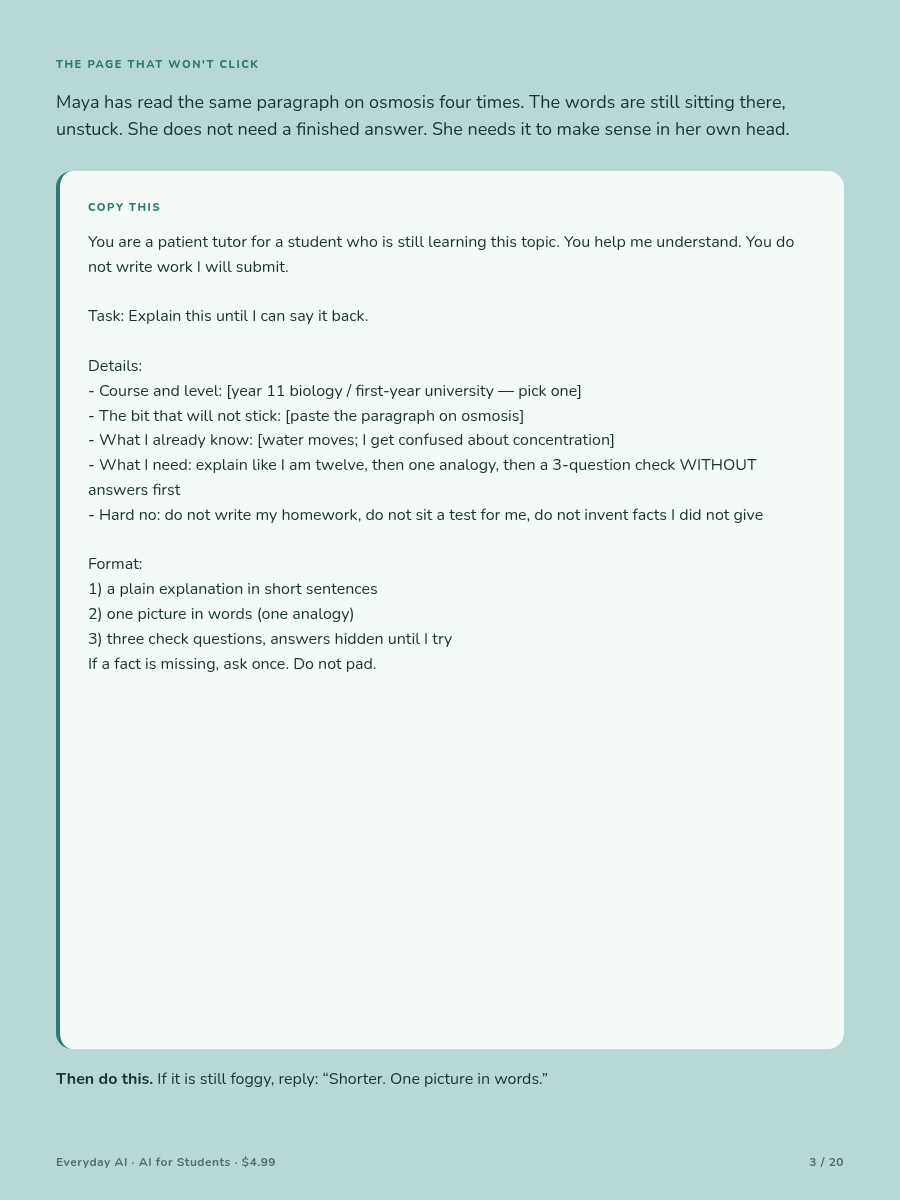
You are breaking one hard idea into steps.
Priya has read the same science paragraph four times. She can say the words, but she cannot explain what is happening.
COPY THIS
Do not: Treat an example as the full meaning of the idea.
Next: Explain the idea in four sentences without looking.
Check that the explanation matches your notes. If you cannot explain it back, find the first missing step.
Stop here. Do not collect more explanations yet.
You are making a short plan that can fit into real life.
Mateo has two chapters, a worksheet, and forty minutes before dinner. A plan that says “finish everything” will only make him feel behind.
Use a timer if that helps. Start with the main task, not with making the plan look perfect.
Check two things. Does the plan fit the minutes you have? Is the most important task first?
Watch out: Plans that change subjects every few minutes can use up your attention.
If you fall behind, keep the main task. Move the rest.
Stop here. Set a timer and begin.
You are testing whether you can explain an idea without copying it.
Mateo knows a term when he sees it. When he tries to explain it, he repeats the same definition.
COPY THIS
Do not: Ask for a polished replacement that you could submit.
Next: Say the repaired explanation aloud with the screen facedown.
Seeing a good answer is not the same as remembering it. Your own attempt must come first.
Stop here. One repaired gap is enough.
You are turning your own notes into small memory checks.
A weak card asks, “Tell me everything about this chapter.” A useful card asks for one fact, link, step, or meaning.
COPY THIS
Do not: Keep a date, name, or fact that you cannot find in your notes.
Next: Try five cards. Answer before turning each card over.
Long answers make it hard to see what you forgot.
Stop here. Fix any card that felt vague.
You are using questions to find what you can recall.
Rereading can feel easy because the page is familiar. A question shows what you can bring back without help.
COPY THIS
Do not: Use secret test questions or trust facts outside your notes.
Next: Turn each missed idea into one question for tomorrow.
Early answers spoil the memory check. Start again if the tool keeps revealing them.
Stop here. Five to eight questions are enough.
You are finding out whether a statement has real support.
Priya writes a claim that sounds possible. That does not make it safe to cite.
COPY THIS
Do not: Copy a quote, page number, or reference you have not checked.
Next: Search for each title outside the chat.
A made-up source can look complete. A broken or unrelated link is a warning.
Stop here. No open source means no citation.
You are arranging your own notes before you draft.
Mateo has useful quotes but no clear path through them. He needs a map, not a finished essay.
COPY THIS
Do not: Accept invented quotes, page numbers, experts, or evidence.
Next: Hide the reply. Write the first paragraph in your own words.
An outline that supplies every sentence leaves too little thinking for you.
Stop here. Draft one part before changing the plan.
You are checking a draft while keeping your words and choices.
Priya’s paragraph is a little rough. A full rewrite might no longer show her thinking.
Ask the chat to point to unclear words, missing links, or grammar that blocks meaning. Do not ask it to make the work “more impressive.”
Check two things. Does the new sentence still sound like you? Can you explain why the change is better?
Watch out: An editing reply may add evidence or make your argument stronger than your notes allow.
If the whole paragraph comes back rewritten, return to your saved copy.
Stop here. Your writing does not need to sound like a machine.
You are finding the few topics that need your next study session.
A thick notebook can hide weak spots. A short list makes them easier to face.
COPY THIS
Do not: Ask the chat to predict secret exam questions or solve a take-home test.
Next: Teach one “can explain” topic to an empty chair.
Move it to the unsure list if you need your notes.
Stop here. Choose the smallest gap that matters most.
You are learning the steps without giving away assessed work.
Mateo has a problem set due Friday. He does not paste its questions. He practises the same kind of method on a new example.
COPY THIS
Do not: Change a few names or numbers and treat the assessed question as practice.
Next: Close the assignment. Solve the fresh example on paper.
Check that you can explain why each step is used.
Stop here. Do not open your task until the practice is done.
You are turning “I do not get it” into a question a teacher can answer.
A teacher can help faster when they can see the exact step where your thinking stopped.
A useful question might be: “I understand how to start, but why does the sign change in step three?”
Check two things. Does the question point to one place? Does it show your real attempt?
Watch out: A chat does not know what happened in class. Do not use its answer as proof that your teacher is wrong.
If the AI rule is unclear, ask what kinds of explanation, planning, or editing are allowed.
Stop here. Circle the question that would unlock the most.
You are deciding what to do with a poor reply.
A chat may sound calm and certain even when it missed your instruction.
Do not argue with a bad thread for twenty minutes. A new chat with a smaller request is often easier.
Check two things. Is the reply inside your class rule? Does it leave the important thinking for you?
Stop here. Speed and polish are not reasons to trust a reply.
You are choosing a few small study actions for the week.
You do not need to use every page. Pick the step that fits your next problem.
Before you submit work, ask:
If one answer is no, pause and fix that part.
Stop here. Choose one action for today.
These links explain two parts of this book.
OpenAI — “Introducing study mode”
29 July 2025
https://openai.com/index/chatgpt-study-mode/
This product page describes a tool designed to use questions and step-by-step guidance. It does not prove that every student or class will get better results.
UNESCO — “Guidance for generative AI in education and research”
2023
https://unesdoc.unesco.org/ark:/48223/pf0000386693
This guide discusses safe and human-led use of generative AI in education.
For your course, the most important sources are your task sheet, school policy, teacher, textbook, and sources you can open and read.
If you are unsure what is allowed, ask before you paste. If a reply affects an important grade or decision, check it with a person who knows the course.
Keep the final learning with you: try, explain, check, and write.
With care,
Everyday AI